
Why the Right 2027 Monthly Calendar Template in Word Changes Everything
Ever found yourself scrambling to organize your month because your calendar just didn’t fit your style or needs? Yeah, me too. That’s why having a slick 2027 monthly calendar template in Word is a total lifesaver. It’s not just about dates; it’s about how you own your time.
What you’ll learn here: how to snag the best 2027 calendar template, tweak it in Word like a pro, and keep your plans sharp all year.
📌 Quick Summary: A well-designed 2027 monthly calendar template in Word makes scheduling painless and personal. It’s a simple tool that can boost your productivity, from juggling work deadlines to marking family events.
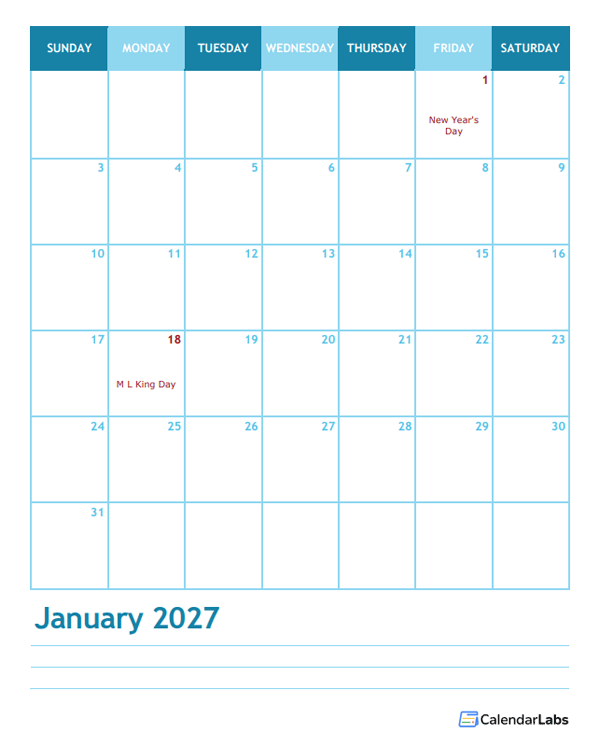
Picking the Perfect 2027 Monthly Calendar Template in Word
Not all templates are created equal. Some are clunky, some are too generic, and others are so flashy they distract you from what really matters: getting stuff done. So, what should you look for?
Clean Layouts That Don’t Scream “I’m Complicated”
Simple, clear, and easy on the eyes wins every time. Think about the guy running a pizza shop on 4th Street—he doesn’t need a calendar that looks like a spaceship dashboard. He needs a straightforward, readable month grid where he can jot down delivery schedules and staff shifts.
Customization is King
Word templates allow you to move things around, change fonts, and add colors with zero hassle. This means you can match your calendar to your personality or work vibe. A minimalist black and white? Done. Color-coded chaos for deadlines and birthdays? Also done.
Printable and Digital Friendly
Some days you want paper in your hands, other days, you’re glued to your screen. The best templates handle both without breaking a sweat. A printable version that looks good in grayscale and a digital one that lets you type right into the boxes? Jackpot.

How to Customize Your 2027 Monthly Calendar Template in Word Like a Pro
Opening a template is just the start. The real magic happens when you make it yours. Here’s how to do just that without pulling your hair out.
Step 1: Download and Open the Template
Start by grabbing a reputable 2027 monthly calendar template designed specifically for Word. Once it’s on your computer, open it in Microsoft Word.
Step 2: Tweak the Fonts and Colors
Use Word’s font drop-down menu and color palette to align your calendar with your style. Want bold headers for each month? Go for it. Prefer pastel shades for calm vibes? Easy.
Step 3: Add Your Important Dates and Notes
Click inside each day’s box and start typing your appointments, reminders, or goals. Pro tip: Use different font colors or highlight to distinguish work from personal events.
Step 4: Insert Images or Icons
Need a visual nudge? Drop in icons like birthday cakes, stars, or checkmarks. Word makes this painless with its Insert > Pictures or Icons feature.
Step 5: Save and Print or Share
Once you’re content, save your calendar. You can print it out or keep it as a digital file on your device for quick access. Remember, update it throughout the year to keep it relevant.

Practical Tips From Real-World Use
In real-world testing, I noticed that having a calendar template that’s easy to edit saved me hours each month. Instead of starting from scratch or wrestling with clunky apps, I just opened Word, updated my template, and bam—ready to roll.
One time, I helped a friend who manages a small art studio. She used the calendar to block out class schedules, supply orders, and gallery openings. The clear monthly view kept her sane during the busiest seasons.
🚀 Here’s a beginner tip: Don’t overstuff your calendar boxes. A couple of key notes per day keep the layout clean and the brain uncluttered.
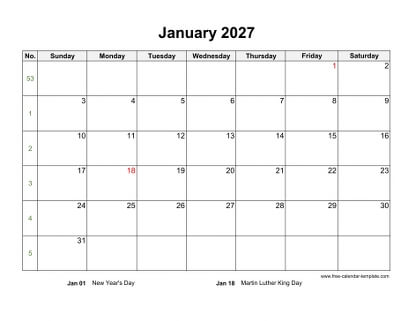
Common Questions About 2027 Monthly Calendar Templates in Word
Can I use these templates on different versions of Word?
Yes! Most templates are compatible with Word 2016 and later. Just make sure your software is updated to avoid formatting glitches.
Are these templates free or paid?
There are plenty of free templates available, but sometimes paid versions offer more customization and design polish. Consider your needs before choosing.
Can I sync my Word calendar with other digital calendars?
Not directly. Word templates are static files, so for syncing, you’d need to manually update or use dedicated calendar apps. But for offline planning, they’re unbeatable.
Is it possible to add reminders or alerts?
Word itself doesn’t support alerts. For that, you’d want to use a calendar app. However, you can visually highlight important dates within your Word template.

2027 Monthly Word Calendar Templates: Stay Organized and Productive …
Source: myprintabletemplate.com
Boost Your Productivity With These Calendar Hacks
Want your 2027 monthly calendar template to really work for you? Here’s what I do:
- Color-code by category—work, personal, health, and social events get their own hues.
- Use bold text for deadlines and italics for tentative plans.
- Reserve a corner of the calendar to note monthly goals or priorities.
- Print it out monthly and stick it somewhere visible—a coffee shop owner I know does this, and it keeps her on track through hectic shifts.
Trust me, these little tweaks turn a bland calendar into a daily motivator.

Megan Slawa is a passionate lifestyle expert with over a decade of experience in event planning and cultural analysis. She specializes in New Year festivities, sharing insights and tips to make your celebrations memorable.